Source: https://mayphus.org/roku-camera-hls/
Title: My IP camera, live on a Roku TV
Metadata: {"category":"note","date":"2026-10-23","id":"roku-camera-hls","kind":"article","language":"en","locale":"en","route":"/roku-camera-hls/","slug":"roku-camera-hls","social_image":{"alt":"The Home Camera channel playing the live camera feed on the Roku TV","height":740,"type":"image/jpeg","url":"https://mayphus.org/media/roku-camera-hls/tv.jpg","width":1200},"tags":["roku","ffmpeg","hls","homelab","linux","operations-record"],"type":"article","work_status":{"code":"private","date":"2026-10-23","role":"Personal home-lab build","state":"experiment"}}
October 23, 2026 · RTSP · ffmpeg · HLS · Roku
I wanted my TP-Link IP camera on my TV. The Roku can't play what the camera sends: a local RTSP stream (`/stream1`) carrying 4K HEVC at 3840×2160 with AAC audio. So I put a translator in the middle. My Linux home server, pb62, pulls the RTSP stream, transcodes it to 1080p H.264 HLS, and serves it over HTTP. A tiny sideloaded Roku channel plays that playlist.
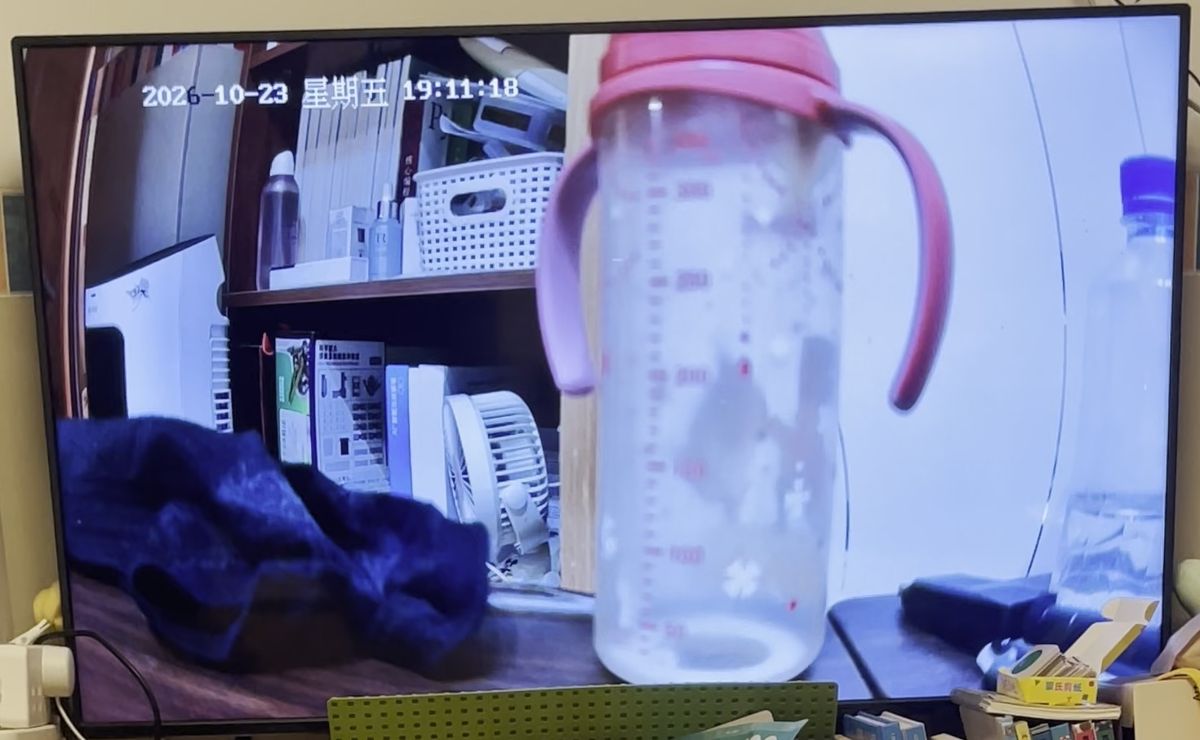
The sideloaded Home Camera channel playing the camera feed on the TV.
It works, and it is a hack. The limits are listed below.
## The pipeline
```
TP-Link camera pb62 (Linux) Roku TV
RTSP /stream1 ──TCP──▶ ffmpeg ──▶ index.m3u8 + .ts ──HTTP──▶ "Home Camera" channel
4K HEVC + AAC 1080p H.264 + AAC :8088 SceneGraph Video node
(python3 http.server) ▲
│ ECP, HTTP :8060
script: launch channel
```
## Transcode on pb62
One script reads the camera credentials from an env file outside the repo, clears the old segments, starts a static file server, then runs ffmpeg in the foreground. Credentials and addresses are replaced with placeholders here.
```bash
#!/bin/bash
# Camera RTSP -> H.264 1080p HLS for Roku, served on :8088
set -a; . "$HOME/.config/camera.env"; set +a # CAMERA_IP, user, password (not shown)
OUT="$HOME/camera/hls"; rm -f "$OUT"/*
cd "$OUT" && (python3 -m http.server 8088 --bind 0.0.0.0 >/dev/null 2>&1 &)
exec ffmpeg -nostdin -loglevel error -rtsp_transport tcp \
-i "rtsp://USER:PASSWORD@CAMERA_IP:554/stream1" \
-vf "scale=1920:-2,format=yuv420p" \
-c:v libx264 -preset veryfast -tune zerolatency -g 30 -b:v 4M -maxrate 5M -bufsize 8M \
-c:a aac -b:a 96k -ac 2 \
-f hls -hls_time 1 -hls_list_size 6 -hls_flags delete_segments+independent_segments \
"$OUT/index.m3u8"
```
What the choices do:
- `-rtsp_transport tcp` pulls RTSP over TCP instead of UDP.
- `scale=1920:-2,format=yuv420p` turns 3840×2160 into 1920×1080 in a pixel format the Roku's H.264 decoder accepts.
- `libx264 -preset veryfast -tune zerolatency` keeps the CPU cost and the encoder delay low, at some cost to quality per bit. Video is capped near 4–5 Mbit/s.
- `-hls_time 1 -hls_list_size 6` with `delete_segments` keeps a short rolling window of six 1-second segments, so the disk doesn't fill.
- `-g 30` sets a keyframe every 30 frames. Segments can only cut on keyframes, so the real segment length depends on the camera's frame rate, which I haven't checked yet.
## The Roku channel
The channel is three small files, zipped and sideloaded with Roku developer mode. `manifest` names it "Home Camera" (FHD UI). `source/main.brs` only opens a SceneGraph screen with one scene:
```brightscript
sub Main()
screen = CreateObject("roSGScreen")
port = CreateObject("roMessagePort")
screen.setMessagePort(port)
scene = screen.CreateScene("CamScene")
screen.show()
while true
msg = wait(0, port)
if type(msg) = "roSGScreenEvent" and msg.isScreenClosed() then return
end while
end sub
```
`components/CamScene.xml` is a full-screen `Video` node plus a status label. It points the video at the HLS playlist as a live stream and restarts it if playback errors out or ends:
```xml
```
```brightscript
sub startStream()
c = CreateObject("roSGNode", "ContentNode")
c.url = "http://SERVER_IP:8088/index.m3u8"
c.streamFormat = "hls"
c.live = true
m.video.content = c
m.video.control = "play"
end sub
sub onState()
s = m.video.state
if s = "playing" then
m.status.visible = false
else if s = "error" or s = "finished" then
m.status.visible = true
m.status.text = "Stream " + s + ", retrying..."
m.video.control = "stop"
startStream()
end if
end sub
```
## Starting it from a script
The Roku also answers External Control Protocol (ECP) requests on HTTP port 8060, so a script can open the channel without the remote. A sideloaded developer channel has the app id `dev`:
```bash
curl -d '' "http://ROKU_IP:8060/launch/dev"
```
## Limits
- **Latency not measured.** 1-second segments and `zerolatency` aim for a short delay, but I have no camera-to-TV number yet.
- **Audio on the TV not confirmed.** ffmpeg encodes AAC stereo; whether the Roku plays it is unchecked.
- **python http.server is a quick hack.** It is bound to `0.0.0.0` on port 8088, with no authentication and no TLS. Anything on the LAN can fetch the live stream. It must stay LAN-only and never be port-forwarded.
- **On demand, not a service.** I start the script by hand (under `nohup`) when I want to watch, and stop it afterwards. Nothing restarts it after a crash or a reboot.
- **Hard-coded address.** The channel has the server address baked in, so a DHCP change breaks it until it is rebuilt.
- **CPU cost on pb62 not recorded yet** for decoding 4K HEVC and encoding 1080p in real time.
- **Developer-mode only.** The channel is sideloaded, not published, and needs re-sideloading if developer mode is reset.
## Next steps
- Measure the camera-to-TV latency and confirm audio.
- Run ffmpeg and the file server as systemd services on pb62, with restart on failure.
- Replace `http.server` with something that binds only to the LAN interface, or put access behind Tailscale like the [Roku remote](/roku-remote-over-tailscale/).
- Check whether the camera offers a lower-resolution H.264 stream; if so, ffmpeg could repackage it with `-c:v copy` and skip the transcode (not checked yet).
## How it was built
Built with AI assistance: an AI assistant helped write the ffmpeg script and the Roku channel. It runs on my own home network.