Selected work

My daughter's grandma called while I was outside the house because she could not find the Roku remote and wanted me to stop a show. The Roku app refused to enable its remote over mobile data, even with Tailscale connected. ChatGPT suggested connecting my phone to any available Wi-Fi, then manually entering the Roku's home IP address. The Wi-Fi satisfied the app's check, manual entry bypassed discovery, and Tailscale carried the connection home. The official Roku remote then worked while I was outside.

I’m starting to optimize my Codex workflow. Instead of making every turn follow a heavy default sequence of pull, change, test, and review—even when a small change takes only a moment—I’m moving toward a hierarchy of iteration, review, and ship. The depth of the workflow should match the size and risk of the change, so a small task does not automatically take two or three minutes. I’m also starting to use Git worktrees so independent work can run in parallel.

I’m going to finish investigating the three TP-Link security cameras with the new ChatGPT Desktop as a hands-on engineering partner. One camera is already torn down and may need a main-chip replacement, so I’ll start with the other two: both still show working IR and PTZ movement at power-on. First I need a longer Ethernet cable. Then I’ll tear them down, connect interfaces, measure signals, form hypotheses, and test likely faults while ChatGPT helps identify serial pins, inspect U-Boot and Linux boot logs, and answer questions quickly. I’ll record the work on YouTube Live, then use the generated transcripts to summarize the investigation and update the website.

Coding, architecture, and other high-level work can be important, but they can also abstract the problem until I lose sight of what actually needs to be solved. I want to begin with the concrete problem, make the smallest useful thing, and only add abstraction when the work asks for it.

A part-time job might be a good fit for me. In theory, full-time employment is not always efficient for either the employer or the employee: people rarely work productively through every hour of a fixed schedule, while focused work often comes in intense bursts that can stretch beyond eight hours when the work is truly moving. Part-time work may leave more room to follow that natural rhythm.

Today I worked on my website while taking care of my daughter. Instead of separating work and life, AI let me fit small moments of engineering into ordinary parenting. It’s only the first day, but it feels like a different way to work.

I am trying to develop a workflow that lets me work mostly on the go—with mobile devices, ChatGPT, AI, and Codex—while still being present and taking care of my daughter. With AI agents, I only need to prompt a few times; most of the work is waiting and thinking. A traditional desktop workflow often keeps me sitting at the computer even when I am mostly searching the web, browsing X, or watching YouTube. The better optimization is to let the agents work while I step away: think clearly, enjoy life, and care for my baby, then return when a decision is needed.

ChatGPT desktop is starting to feel like the AI version of Emacs: one extensible environment with a terminal, browser, code, files, and conversations together. The important part is not having every tool in one window. It is that my operations and working state can become shared AI context, so I spend less time switching apps and explaining where the work stopped.

Short ideas should have one quiet public home. They do not each need a new page, project, or polished conclusion. A dated thread can show the thought while it is still moving.

ChatGPT desktop quietly added passkey/password support to its in-app browser — something I’ve wanted for weeks. This matters because I sign in to Google with a passkey. Now the in-app browser can handle it. One less reason to open Chrome, haha.

Photos

Authenticated albums, exports, and layout tools still need a complete public entry point.

Family

The login-gated family space is still only a public shell.

Daily

Local drafts exist, but the login-gated record timeline is unfinished.

A personal site is more useful when it shows working artifacts and operating evidence instead of describing ambitions. Build the proof, then write the sentence.

The smallest useful project note records where the work stopped, the next physical action, and the evidence already captured. That is enough to make tomorrow easier.

I used ChatGPT Atlas as my main browser and loved it, even though it’s no longer maintained. But ChatGPT desktop doesn’t need to replace Chrome. My workflow now: Chrome for the web, ChatGPT desktop for intelligence, and the ChatGPT extension connecting them. It feels natural.

Some people dislike GPT-5.6 and the “super app.” I think they’re amazing. Real engineers and users don’t spend all day judging models or comparing flaws—they use the tools to build something amazing. Extraordinary capability at a low cost, shared globally, is worth appreciating.

LambdaCAD

Racket-first CAD for mechanical ideas, shapes, parts, and manufacturable models.

Cangjie Tree

Visual exploration of Cangjie character structures.

Chinese Zodiac

Chinese zodiac generation and reference experiments.

Demo

Inbox of small runnable demonstrations recovered from the archive.

Diet

Food, nutrition, and personal diet experiments; only a sanitized shell is public.

Drone Performance

Declarative drone choreography, simulation, safety checks, and show export.

Facade Light

Declarative architectural lighting, mapping, preview, and controller export.

FIFA

Football tournament data and document-rendering experiments.

Job Hunter

Personal job-search tooling; this public page excludes private applications and resume data.

Music Fountain

Declarative water, pump, color, and music-synchronized choreography.

Home Network

Public-safe graph view of the Mayphus home LAN topology.

Package Tool

Package-management and installation workflow experiments.

Shop Prototype

Archived Cloudflare shop prototype with route and binding declarations.

Integrated Show

Shared timeline for lights, fountains, drones, music, and performance channels.

WeShop

WeChat commerce app with mini program, CloudBase functions, and admin console.

Biology Diagrams

Cell-structure and DNA-strip SVG generators.

Calculus Visual Lab

Interactive calculus figures, exports, and TypeScript widgets.

Chemistry

Chemical formula parsing, element counts, tests, and a web interface.

Circuit Symbol Atlas

Printable atlas of electronic circuit symbols.

Flashcards

Generated flashcard interface and source model.

Flower Studies

Generated daisy, cosmos, lily, lotus, rose, sunflower, and tulip studies.

World History Chart

Large generated world-history chart for screen and print.

Icon Forge

Declared icon scenes with rendering, licensing, and source attribution.

Racket Mathematics and 3D

Numeric visualizations, surfaces, meshes, curves, and interactive 3D.

Interactive Artillery

Projectile-flight visualization with quadratic drag.

Pixel

Pixel-art DSL, palette, renderer, overview generator, and artwork catalog.

Trime

Android Rime theme, schema, and configuration collection.

Vertical Book

Traditional vertical Chinese book-layout DSL and PDF renderer.

English Word Wallpaper

Rotating Oxford 3000 word wallpaper built with Racket.

Building mayphus.org Live #2

Today I'm reorganizing my infrastructure page. I realized that my website should explain my Kubernetes cluster, Podman containers, KVM virtual machines, and network visually instead of hiding everything behind text. This livestream is me refining both the website and the idea.

Today's realization: I'm not at my best when answering from memory. I'm at my best when investigating. Give me a terminal, logs, and a problem. I'll figure it out. Learn. Repeat. That's how I'm going to learn and build in public.

Looks inside Roku Remote

My Roku Remote voice feature don't works weeks ago, and today all buttons don't works. So I decide to teardown and see what is inside. After teardown and try again. it works. I think it's battery case has issue? And voice feature continue don't works. I don't see any water or possible visual broken. So wait for next time to investigate.

Forget the superapp. Just let ChatGPT and Codex share memory. Re-explaining the same project to both is unnecessary friction.

Just migrated my codebase to my mini PC. Maintained by Codex now, so I barely need my desktop PC anymore. I can work from coffee shops, supermarkets, etc.

I don’t remember the commands anymore. I remember the curiosity. Ten years later, most of the software is obsolete, but the habit of taking things apart, experimenting, and documenting what I learn is still the most valuable skill.

Look inside a Toddler's Electronic Learning Book

This children’s electronic learning book stopped working.

I just realized I first tried ROS almost 10 years ago. This photo was taken in an old, almost abandoned office at my university. July 2017.

After reinstalling the Codex mobile app and pairing it again, sync issues disappeared. The app also feels smoother, though I'm not sure if that's because of the reinstall or just my perception.

Fixed a sync issue between Codex Desktop and the mobile app. The solution was to uninstall the Codex app on my phone, then pair it again.

Found these old photos today. My Raspberry Pi 3 used to be the brain of my ROS robot. I lost this Pi after buying a Raspberry Pi 4, but I still have the other boards in the box. Maybe it’s time to build something with them again.

Just investigate 3 broken TP-Link Security Camera #2

00:00 Broken TP-Link Camera Investigation Begins 00:43 Connecting UART Debug Interface 05:04 Using AI as a Hardware Repair Assistant 07:04 No Serial Output After Power-On 10:18 Checking Power Rails 15:49 Suspecting a Power Circuit Fault 18:07 Testing the USB-TTL Adapter 20:11 UART Loopback Verification 23:07 Verifying 3.3V Logic Levels 27:21 Reconnecting UART Lines 28:01 Second Boot Attempt 32:39 Searching for Camera Hardware Information 34:00 Why the Camera Probably Isn't Booting 35:03 Wrap-Up & Future Investigation

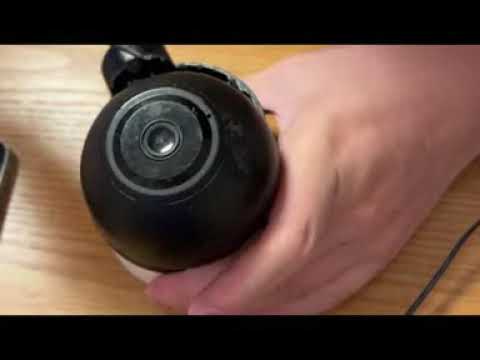
Inside a broken TP-Link security camera

I bought this broken TP-Link security camera for about $1 to learn how it is built.

Just investigate 3 broken TP-Link Security Camera

Investigating 3 broken TP-Link security cameras bought for about $1 each.

A generated Flypy double-pinyin skin. Instead of drawing keyboard themes manually, I'm generating them from code so the same system can produce skins, previews, and configuration packages automatically. mayphus.org/typing

Discover mayphus.org/han – a Racket-powered web tool I built for creating print-ready 3500-character matrix posters.

Visualizing Every Unicode Character (Plane 0 to 16)

This is a complete visual walkthrough of a massive matrix grid UI designed to browse every single character space across all 17 Unicode planes (Planes 0 to 16). https://mayphus.org/unicode/ do you like it?

Just built a massive Unicode matrix! 🚀 You can visually browse every single character from Plane 0 all the way through Plane 16 in one clean, responsive grid. Check out the UI layout in the video below. What do you think? mayphus.org/unicode/

Just powered through a 50 KM ride. 🚴‍♂️✨ Legs on fire, heart full—cycling goals unlocked. #CyclingLife #Endurance

I implemented RP2040 official minimal design. #rp2040 #raspberrypi #raspberrypipico #soldering #diy

This board follows the official RP2040 minimal hardware design from Raspberry Pi.

Soldering an ESP32 PCB: Showcasing Skills Despite a Design Flaw

I attempted to design a minimal PCB for the ESP32, but it seems to have some issues—possibly related to power delivery or the EN pin. However, I’m glad to see my soldering skills haven’t gotten rusty! I successfully soldered a USB-C connector using just a soldering iron and used a heat station for the first time to solder the ESP32 chip itself. The results were fantastic. #diy #sold #soldering #solderingiron #esp32

I DIY a mini desk monitor. Just a screen currently, more features will be added. #diyprojects

A YouTube Short.

Made a simple displayer. Used a Raspberry Pi Pico, and 1.69 in LCD. And made my first useful PCB board. #diy #pcb #3dprint

Boring game with accelerometer #diy #diygames #raspberrypizero #mpu6050 #tftdisplay #circuitpython

A YouTube Short.

First day of 2025. Completed my first 3 kilometers running and booted my new Raspberry Pi Zero 2 W.

Witness the Majestic Qiantang River Tidal Bore: Nature’s Ultimate Spectacle!

FreeBSD is my favorite. I never need to choose between different Linux distributions and package managers. And in FreeBSD both basic freebsd system and third party packages are easy to find the sources. Make the system ‘transparency’.

Excited to share my first open source contribution! Just submitted a patch to FreeBSD to fix documentation for thin nullfs jails. #OpenSource #FreeBSD #FirstContribution

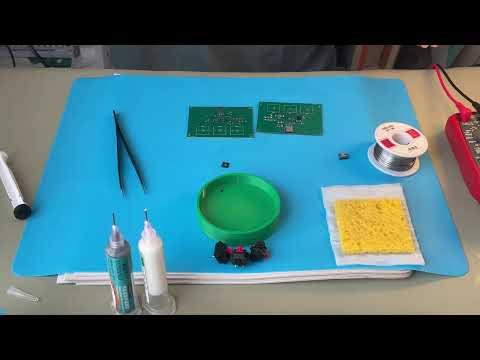
Desoldering My First Failed PCB Design: RP2040 Board Teardown

In this video, I'm desoldering components from my first self-designed PCB - a basic RP2040 minimal design. Although the design didn't work as intended, it marks an important milestone in my maker journey. Watch as I carefully remove components from this failed PCB, demonstrating proper desoldering techniques.

Start to practice free talk. This time with a more freely style, the main goal is output something useful content.

Making Century Egg. Warping lime now, then wait for the magic of time. #centuryegg #chinesefood

A YouTube Short.

Start running again. This time mainly focus on health, and habit building. Ignore speed, ignore marathon.

I love Emacs org-mode to take notes. denote is my favorite tools, because I can use it start taking notes from minimal. Not like org-roam. #emacs #orgmode

Chinese launch, tomato, eggs and rice. Eat with my big spoon. So delicious. #chinesefood #wfh

A YouTube Short.

A month ago, I upload a practicing English short video to Chinese instagram 小红书. After that I update daily. Why I do this because I have social anxiety and lack up speaking communication skills. One month of practice improve m a lot I think. I will continue to do that.

Hi, My name is Felix Tang. I am learning and practicing English as a non-English speaker. I also want to share my mind and skills with this way. I also upload daily practice videos to my YouTube channel. I help these methods can save my English.

Building my ROS robot vehicle. After learning with turtlesim, I started putting the physical platform together: a wheeled chassis, stacked controller and motor-driver boards, power wiring, and a cooling fan, all still exposed while I debugged it beside the laptop.

Working like a professional in an abandoned office at university, trying to learn ROS. I turned the empty room into a three-monitor lab, worked through the ROS tutorials, and got turtlesim running. The setup looked serious; I was still learning from the beginning.

At university, I helped others get this linear actuator moving. The work brought the whole control path onto one desk: code on the laptop and monitor, a power supply, controller boards, a breadboard, wiring, and the actuator itself.

These photos are from a mechanical competition in November 2016. I built a tall wheeled robot from aluminum plate, steel rods, laser-cut wheels, gears, an AT89X51 controller, and ultrasonic sensors. The workbench photos show the mechanism and electronics coming together; the final photo shows the robot on the competition track.

My first time using an AT89X51 microcontroller. I built and debugged the circuit on breadboards, surrounded by jumper wires, handwritten notes, a programmer, and a multimeter. The LEDs, seven-segment display, and ultrasonic sensors made the code visible in the physical world.